- Home
- Smart meter field operations
- Field attendance
Solution
GPS selfie attendance for field staff
PIEBENCH records field staff attendance with a selfie and GPS location when each technician goes on duty. It checks staff in against your deadline, flags short duty hours and overtime, and raises a stationary-agent alert when a phone barely moves during a shift. Office staff can be limited to checking in within a geofence. Attendance sits next to each person's jobs, so presence and output are seen together.
Attendance is the oldest field problem
Long before smart meters, every utility supervisor knew the question: who was actually out today? Paper registers get signed in bulk. A phone call at 10 a.m. proves nothing. And on a rollout paid per meter, an absent crew shows up as a shortfall a week later, when it is too late to fix.
Field attendance in PIEBENCH is built to answer that question the same morning, without making supervisors into detectives.
How it works for a technician
- Go on duty. At the start of the day, with signal (at the depot, for example), the technician taps on-duty in Scout. A selfie is required by default, and the app records their GPS location.
- Work. Jobs are done as normal. While on duty, their location is visible to supervisors through On-Duty live tracking.
- Go off duty. When the shift ends, they check out. A checkout selfie can be required too.
Tracking that feels like surveillance is a regular complaint in Reddit threads about workforce apps. That is why live location here is tied to being on duty. More on that in the best workforce management app, judged by Reddit pain points.
That is all the technician does. The rest is calculated.
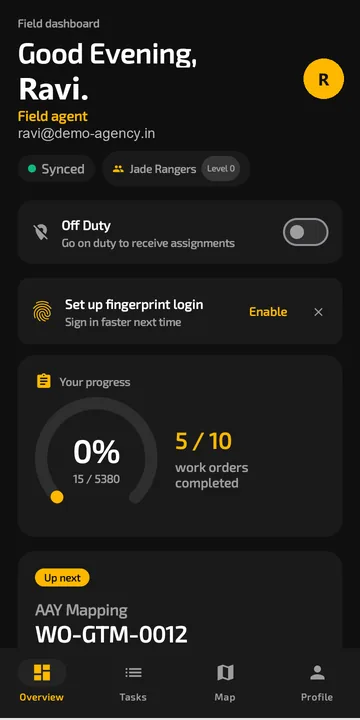 The field dashboard: the on-duty switch, sync status and the day's progress in one place.
What supervisors get
Present by the deadline. You set a check-in deadline (09:00 by default). Staff must go on duty by then to be marked present.
Duty hours. Each shift's length is recorded. Shifts shorter than your minimum (six hours by default) are flagged as below threshold, and shifts longer than your overtime threshold (ten hours by default) are flagged as overtime.
Stationary agents. If a technician's total movement during a shift stays within a small radius (50 metres by default), they are flagged as stationary. A crew member who checked in and then never left the tea stall stands out without anyone having to watch a map.
Selfies on record. Each check-in selfie is stored with the attendance record, which deals with the classic problem of one phone checking in for three people.
All of these thresholds are settings, so you can match them to your shift pattern instead of the defaults.
Geofenced check-in for office staff
Office and depot staff work from a fixed place, so for them attendance can be tied to a location. Turn on geofenced check-in, set the centre point and a radius (200 metres by default), and they can only go on duty from inside it. Field staff are not limited this way, because their work moves.
Attendance next to output
Attendance on its own says who turned up. Next to the job data it says much more. In PIEBENCH, the same person's check-in, location and approved jobs sit side by side, so a technician who is on duty all day with no completed jobs, or who completes jobs while flagged stationary, is easy to spot. On the Pro plan, performance tracking and a leaderboard add points and GPS accuracy to the picture.
Fair, not just strict
Attendance data is also how you defend your crews. When an agency is accused of not working an area, check-in records, live tracking and timestamped job photos show exactly where they were. Good crews tend to like a system that makes their effort visible.
Which plan
Field and office attendance and On-Duty live tracking are included from Starter at $199/month. Performance tracking and the leaderboard come with Pro. See pricing.
Built to integrate with your systems
HES, MDM, SAP IS-U, Oracle CC&B and billing systems, over REST, OAuth or a direct SQL connection. How integrations work
Questions buyers ask
How does GPS selfie attendance for field staff work?
The technician taps on-duty in the app at the start of the shift, takes a selfie and the app records their GPS location. PIEBENCH then marks who was present by the deadline and flags short shifts, overtime and stationary agents automatically, and stores the selfie with the attendance record.
What is stationary agent detection?
It flags a technician whose total movement during a shift stays within a small radius, 50 metres by default. In field work that usually means someone checked in but did not go out to sites. The radius is a setting you can change.
Can office staff be restricted to checking in from the office?
Yes. Turn on geofenced check-in, set the office location and a radius (200 metres by default), and office staff can only go on duty from inside it. Field staff are not geofenced, because they work across many locations.
Can I set my own shift rules?
Yes. The check-in deadline (09:00 by default), minimum duty hours (six by default), overtime threshold (ten hours by default), whether a selfie is needed at check-in and checkout, and the stationary radius are all settings.
Does attendance work without mobile network?
Going on duty needs a connection, so crews should check in at the depot or anywhere with signal before heading out. After that, the field work itself is offline-first: jobs are saved on the phone and sync later.
Which plan includes field attendance?
Field and office attendance and On-Duty live tracking are included from the Starter plan at $199/month. The free trial is for trying the core workflow with a few users.
Free trial · no card
See it with your own crew
Start a free trial, or ask us for a walkthrough of your rollout.