- Home
- Smart meter field operations
- No-code workflow builder
Solution
A no-code field operations platform for utilities
PIEBENCH is a no-code field operations platform for utilities. An admin builds field forms from text, number, dropdown, checkbox, checklist, barcode, photo, GPS and counter fields, marks the ones that are required, and publishes them to crews' phones without a developer. Templates for meter installation and consumer indexing come ready, and forms can change the same day the DISCOM's requirements do.
Why field forms keep changing
No one designs the perfect form before a rollout starts. The details turn up in week two, from the field. The DISCOM wants the DT code on every job. The AMISP wants a second seal photo after a tamper dispute. A crew points out that the old meter's make matters for the scrap count. Each change is small, and each used to mean a ticket to a vendor and a wait for an app release.
In PIEBENCH, the person running the project makes the change.
What you can build
Field types. Text (with a number keyboard where needed), dropdown, checkbox, checklist, barcode scan, photo, GPS location and counter. Between them they cover nearly every field job a utility runs: meter installation, consumer indexing, NCM visits, new connections, disconnections, inspections.
Required fields. Mark any field as required, and a job can't be submitted without it. This is the simplest and most effective way to stop rework: no photo, no submit.
Order and labels. Arrange fields in the order a technician works at the premises, with labels and placeholder hints in the language your crews use.
What happens on completion. Each workflow can move the service point to a lifecycle stage when a job is completed, for example from "indexed" to "installed". The Meter Installation template also creates an installation record from the form, with the new meter serial and date.
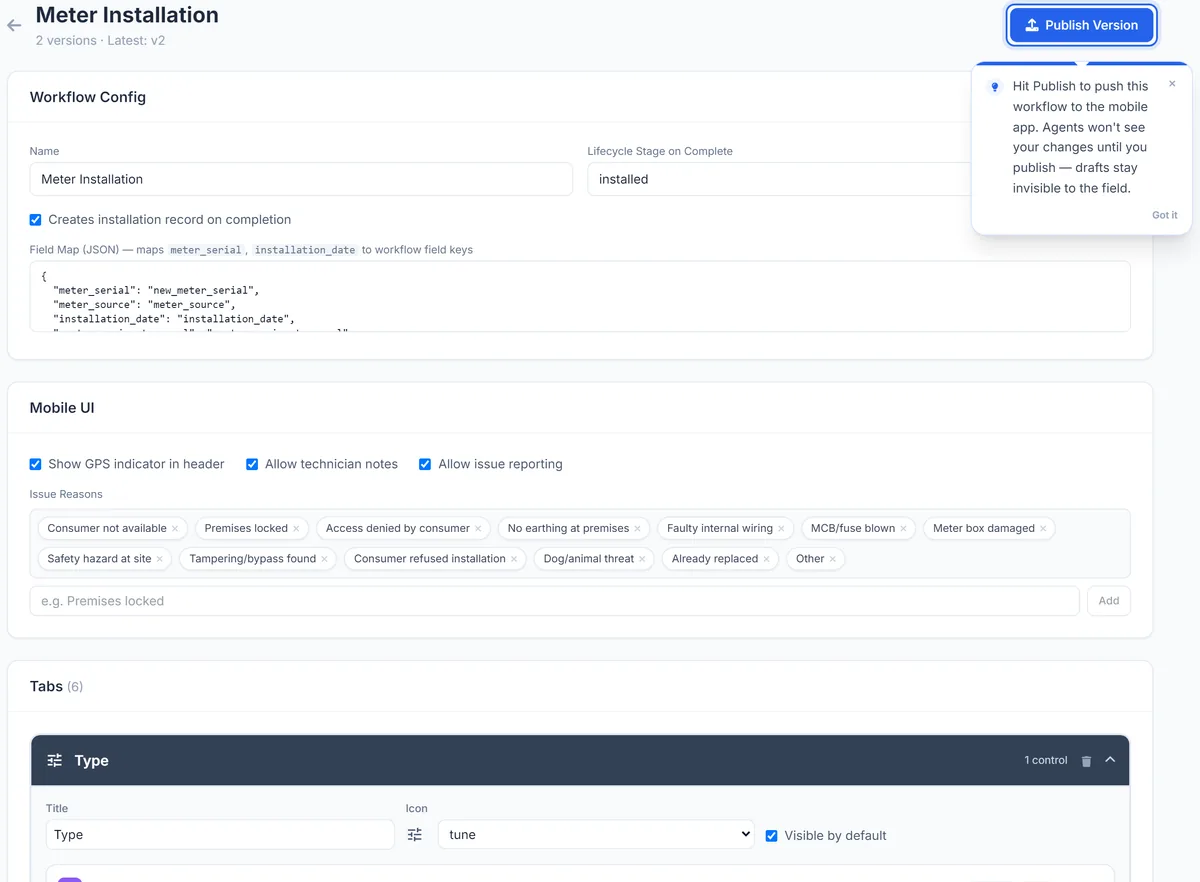 Editing the Meter Installation workflow: fields, issue reasons and tabs. Publishing sends the new version to phones on their next sync.
Start from a template
Two templates come ready:
- Meter Installation: old meter barcode and serial, final reading, old meter photo; new meter barcode and serial, initial reading; seal barcode and number; photo of the installed meter; GPS.
- Consumer Indexing: a photo of the meter or premises and a GPS fix, ready for your own consumer, DT and feeder fields.
Starting from a template and adjusting it is usually quicker than a blank form.
Versions, not surprises
Forms are versioned. When you change a workflow, the new version applies from then on, and jobs already submitted keep the version they were filled in on. That means a field you add in month three doesn't make every earlier record look incomplete. A new version reaches crews' phones on their next sync, with no app update to install.
Approvals and rules on top
A form is only half a workflow. Submitted jobs land in an approval queue, where supervisors approve them or reject them with a note. On the Pro plan, auto-approval rules can pass routine jobs that meet your criteria, so supervisors only look at the exceptions. See installation verification.
No code also means integrations
The same no-code approach applies to connecting systems. Connectorly links forms and jobs to your HES, MDM or billing system over REST, OAuth 2.0, SQL or webhooks, with AI-suggested field mapping. See integrations.
Which plan
The workflow builder is part of Pro ($499 a month) and Enterprise, along with Connectorly and auto-approval rules. See pricing.
Built to integrate with your systems
HES, MDM, SAP IS-U, Oracle CC&B and billing systems, over REST, OAuth or a direct SQL connection. How integrations work
Questions buyers ask
Is there a no-code field operations platform for electricity utilities?
Yes. PIEBENCH lets utility teams build field forms and workflows without code, from text, number, dropdown, checkbox, checklist, barcode, photo, GPS and counter fields. It ships with Meter Installation and Consumer Indexing templates, and connects to HES, MDM and billing systems through no-code integrations.
Can I change a field form in the middle of a rollout?
Yes. An admin edits the workflow in the builder and publishes a new version. Jobs already submitted keep the version they were completed on, so earlier records stay consistent, and new jobs use the updated form.
Which field types does the form builder support?
Text (with a number keyboard where needed), dropdown, checkbox, checklist, barcode scan, photo, GPS location and counter. Any field can be marked as required, so a job can't be submitted until it is filled in.
Do I need a developer to build an NCM or new connection form?
No. Start from a blank workflow or a template, add the fields you need (for example a dropdown for fault found and one for action taken, required photos and GPS), and publish it. The person running the project can do it.
Can a completed form update other records?
Yes. A workflow can move the service point to a lifecycle stage on completion, such as "installed". The Meter Installation template also creates an installation record with the meter serial and date.
Which plan includes the workflow builder?
The workflow builder is included in Pro, at $499 a month, and in Enterprise. Both also include Connectorly integrations and auto-approval rules.
Free trial · no card
See it with your own crew
Start a free trial, or ask us for a walkthrough of your rollout.