- Home
- Smart meter field operations
- Offline field app
Solution
An offline field app for low network areas
Scout, PIEBENCH's Android app, is an offline field app built for low network areas. Every job, reading, barcode scan and photo is saved on the phone first, so crews can work a full day in basements, rural feeders or hill districts. When signal returns, everything syncs automatically. It runs on Android 7.0 and later, so low-end phones work.
Why "works offline" is usually not true
Plenty of field apps say they work offline. What many mean is that the app opens without signal, or that a form can be filled in but not saved, or that photos upload later "if possible". Crews find the gaps quickly: a job lost because the app timed out on submit, photos that never arrived, a day's work stuck on a phone that was reset.
For smart meter work this is not an edge case. Meter rooms are in basements. Rural feeders run past the last tower. Old city lanes block signal. Non-communicating meters cluster, by definition, where coverage is poor. An app that needs a live connection loses work in exactly the places a rollout is hardest.
How Scout handles it
Offline-first, not offline mode. Scout keeps the crew's data in a database on the phone. Opening a job, filling it in and saving it all happen locally, whether or not there is signal. There is no offline mode to remember to switch on.
Jobs come down in advance. The work orders and service points assigned to a crew sync to the phone while it has signal, so the day's list is there before they leave the depot.
Everything is captured on the device. Readings, barcode scans, GPS fixes and photos are stored with the job on the phone. There is no fixed limit on how many jobs or photos can wait to sync; the only limit is the phone's free storage.
Photos are compressed on the phone. Each photo is compressed before upload, so a full day of meter and seal photos can go up over a weak 2G or 3G connection at the end of the shift.
Sync is automatic. When the phone has signal again, completed jobs upload on their own. Supervisors see them in the approval queue as soon as they arrive.
The field wins conflicts. If the same record changes on the phone and in the office while the phone is offline, the phone's version is kept when it syncs. Field evidence captured at the premises doesn't get silently overwritten by an edit made at a desk.
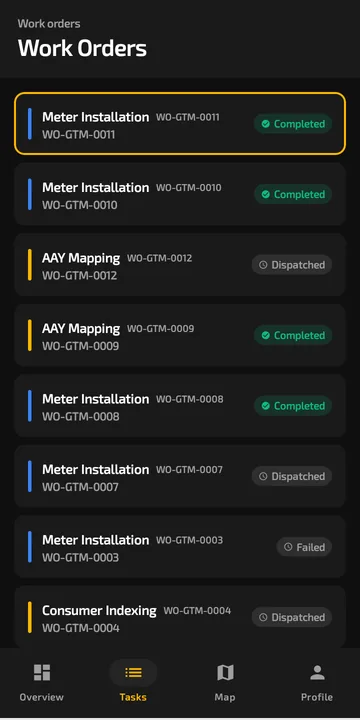 Work orders live on the phone with their status, signal or no signal.
Built for the phone the crew already has
Scout runs on Android 7.0 and later, which covers most low-end phones that field crews carry. It is designed for gloved hands and bright sunlight, with barcode and voice input where typing would be slow. Barcode scanning uses the phone camera, so there is no separate scanner to buy or lose.
Test it before you buy anything
The quickest way to judge any field app's offline claim:
Losing work when the signal drops is one of the most common complaints field technicians post on Reddit about their apps. We collected the others in the best workforce management app, judged by Reddit pain points.
- Put a low-end Android phone in airplane mode.
- Open a job, complete a full meter replacement: old meter reading, new meter barcode, seal numbers, four photos.
- Do two more jobs the same way.
- Restart the phone, still in airplane mode, and check the jobs are still there.
- Turn airplane mode off and watch what reaches the office, and how long it takes.
If any photo or field goes missing, that is what will happen in a basement meter room on day 40 of your rollout.
Where offline matters most
- Smart meter installation, where crews work through meter rooms and dense lanes all day.
- Consumer indexing, where surveyors cover every premises, including the hard-to-reach ones.
- NCM resolution, where the meters being visited are silent precisely because signal is poor.
Scout is included in every plan, from the free trial up. Paid plans start at $199/month; see pricing.
Built to integrate with your systems
HES, MDM, SAP IS-U, Oracle CC&B and billing systems, over REST, OAuth or a direct SQL connection. How integrations work
Questions buyers ask
What is the best offline field app for low network areas?
One that is offline-first: it saves everything on the phone before trying to sync, keeps the day's jobs on the device, compresses photos, and syncs automatically. Scout, PIEBENCH's Android app, works this way for smart meter crews. Test any candidate in airplane mode on a low-end phone before you choose.
Can field staff complete a whole day without network?
Yes. In Scout, jobs assigned to a crew are already on the phone, and everything captured during the day is saved locally. When signal returns, completed jobs sync automatically. There is no fixed limit on queued jobs or photos beyond the phone's storage.
Do photos upload properly on slow connections?
Scout compresses photos on the phone before upload, which keeps a day of meter and seal photos small enough to sync over a weak 2G or 3G connection.
Which Android version does the offline app need?
Android 7.0 or later. That covers most low-end phones used by field crews, so agencies can usually start with the phones their technicians already carry.
Is there an iOS version of the offline app?
No. Scout is Android-only, because most utility field crews in India use Android phones. Supervisors and office staff use the web console in any browser.
What happens to unsynced jobs if the phone restarts?
They stay on the phone. Scout stores jobs in a local database, not in memory, so a restart or a dead battery does not lose saved work. Jobs sync once the phone is back on and has signal.
Free trial · no card
See it with your own crew
Start a free trial, or ask us for a walkthrough of your rollout.