- Home
- Smart meter field operations
- Installation verification
Solution
Smart meter installation verification software with photo and GPS evidence
PIEBENCH verifies smart meter installations by attaching evidence to every job: timestamped photos, a GPS fix with its accuracy, the meter serial scanned from the barcode, and seal numbers. Rules can check that evidence automatically, supervisors approve or reject the rest with a note, and duplicate meter serials are refused, so you can count verified installations separately from submitted ones.
Why verification matters more than speed
A rollout's numbers are only as good as the jobs behind them. When an AMISP reports 1,000 installs for the week, the DISCOM is taking that on trust until something goes wrong: a consumer complains they never got a meter, a meter never commissions, or an audit finds two jobs with the same serial.
Most field teams are honest. Verification is mostly about the other problems: a technician who closed jobs from the depot to beat a target, a supervisor who batch-approved a day's work without opening it, a typo that sent a serial to the wrong account. The aim is a record you can stand behind, without accusing anyone.
What gets checked on every job
Photos with timestamps. Before-and-after photos of the meter, plus the seals. The photo fields can be made mandatory in the form, so a job can't be submitted without them.
Location, and how precise it is. Each job records a GPS fix with its accuracy, so a reviewer can tell a precise fix from a rough guess. PIEBENCH also tracks GPS accuracy per technician over time, so a pattern of poor fixes stands out.
Location checked against the record. If the service points came from billing with coordinates, an auto-approval rule can compare the job's GPS fix with the service point's stored location, and approve or reject the job automatically depending on the result. The rules are configurable: they can match any value captured in the field against any existing property of the record, so location is one example among many. Auto-approval rules are part of the Pro plan.
The meter itself. The serial is scanned from the barcode, which removes most transcription errors. If a serial already exists in the project, the job is refused. That one rule catches copy-paste mistakes and recycled photos before they reach commissioning.
Seals. Seal numbers have their own fields and their own photo, because a seal is often the first thing checked when a meter is suspected of tampering later.
Your own checks. Every AMISP and DISCOM has its own idea of proof: a consumer confirmation, a photo of the meter box, a reading on the old meter. Because the forms are configurable, any of these can be added as a required step without going back to a developer.
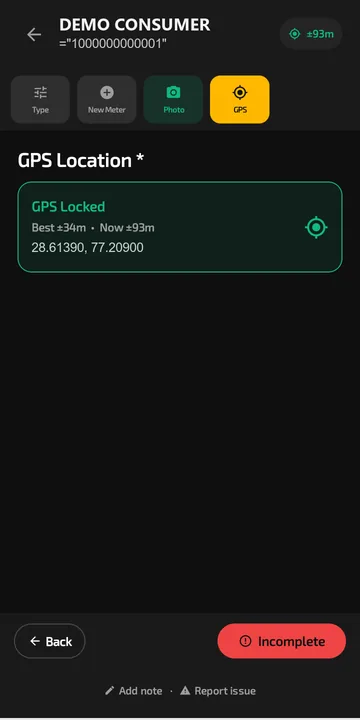 Scout records the GPS position and its accuracy with every job, so the office can check the meter is where the record says.
How the review works
- The crew submits. The job leaves the phone with all its evidence attached, or waits on the phone until there is signal.
- It lands in the approval queue. Supervisors see pending jobs with their photos, location and serials in one place.
- Approve, or reject with a note. A rejection carries a note saying what is wrong, such as "seal photo unreadable" or "final reading missing". The technician sees the note in the app and knows exactly what to fix.
- Rules handle the routine. On the Pro plan, auto-approval rules can pass jobs that meet your criteria, so supervisors spend their time on the exceptions instead of clicking through clean jobs.
- Approved means verified. The approval status stays on the job, so the number you report can be the verified number, not the submitted one.
Paying installers for verified work
Many AMISPs pay installation agencies, and agencies pay crews, per meter. The fairest basis for that is a meter that passed review, not one that was merely submitted.
Because every job carries an approval status and is tied to a technician, a team and, where you use them, a contractor, PIEBENCH holds the data you need to count verified installs per agency for a period. Filter approved jobs by contractor and date in Smart Views to get that count.
Catching problems early, not at month end
A verification process that only runs at the end of the month finds problems after they have multiplied. In PIEBENCH, rejections are visible the same day. Smart Views can show rejections by crew, so if one crew's rejection rate climbs on a Tuesday, a supervisor can be on site by Wednesday.
Attendance closes the loop. Selfie and GPS check-in shows who was actually in the field, and stationary-agent detection flags a technician whose phone has not moved for a long stretch during working hours.
Accountability without the blame
Everything above leaves a trail. Each approval, rejection and edit is recorded in an audit log, and access is split across seven roles, so a crew member can't approve their own work. When a dispute comes up months later, the answer is a lookup, not an argument.
Plans with approvals start at $199/month; auto-approval rules are part of Pro. See pricing.
Built to integrate with your systems
HES, MDM, SAP IS-U, Oracle CC&B and billing systems, over REST, OAuth or a direct SQL connection. How integrations work
Questions buyers ask
How do I stop fake meter installations?
Make the evidence part of the job rather than an afterthought. Require timestamped photos, a GPS fix, a scanned serial and seal numbers before a job can be submitted, refuse duplicate serials, and have someone other than the installer approve it. PIEBENCH does all of this, and keeps verified jobs separate from merely submitted ones.
Can a supervisor reject an installation and ask for a fix?
Yes. Each submitted job sits in an approval queue. The supervisor can reject it with a note such as "seal photo unreadable", and the technician sees that note in the app. The corrected job comes back through the same queue, so nothing is approved without a second look.
How do I know the technician was actually at the premises?
Each job records a GPS fix along with its accuracy, plus timestamped photos of the meter and seals. Together they show where and when the work happened. PIEBENCH also tracks each technician's GPS accuracy over time, and on Pro an auto-approval rule can compare the fix with the service point's location from billing.
Does PIEBENCH catch duplicate meter serials?
Yes. If a meter serial already exists in the project, the job is refused. This catches copy-paste mistakes and recycled records before they cause commissioning failures or billing disputes. Because serials are scanned from the barcode, transposed digits are also much rarer than with typed entries.
Can installers be paid only for verified jobs?
Every job carries an approval status and is linked to the technician, their team and their contractor, so you can count verified installs per agency for any period. Use that count, rather than submitted jobs, as the basis for paying agencies and crews.
Will verification slow my crews down?
Not much, because the checks happen while the job is being done. Scanning a barcode is faster than typing a serial, and the photos are taken anyway. On the Pro plan, auto-approval rules pass routine jobs automatically, so supervisors only review the ones that need a human eye.
Free trial · no card
See it with your own crew
Start a free trial, or ask us for a walkthrough of your rollout.