- Home
- Smart meter field operations
- For AMISPs & installation agencies
Who it’s for
An AMISP field operations tool for every agency and crew
PIEBENCH is a field operations tool for AMISPs and the installation agencies working under them. Each agency's crews use the same offline Android app, while the AMISP sees installs, rejections and attendance per agency and crew every day. Approved installation data syncs to the HES, MDM or billing system, so nobody merges spreadsheets at the end of the week.
The AMISP's problem is other people's crews
Under India's RDSS programme, an AMISP (Advanced Metering Infrastructure Service Provider) handles smart metering for a DISCOM end to end. In practice that means answering for hundreds of thousands of installations done by crews it does not directly manage. The work is usually split across several installation agencies, each covering a few districts, each with its own supervisors and its own way of reporting.
So the AMISP's week looks familiar. Agency A sends an Excel sheet. Agency B sends a different Excel sheet. Agency C sends photos on WhatsApp and promises the sheet tomorrow. Someone at head office spends Friday merging them, and the number that goes to the DISCOM is already three days old and never quite reconciles.
PIEBENCH replaces that relay with one system that every agency works in, on the AMISP's terms.
How it is set up
- Register each agency as a contractor. In PIEBENCH, an installation agency is a contractor, and its teams sit under it. Every job a crew completes is tied to the technician, the team and the agency.
- Give every crew the same app. Technicians use Scout, the offline Android app, with the forms you define. Agencies don't get to invent their own format.
- Set the review rules. Decide who approves what. Seven roles keep each person to what they need, and every action is logged. Agency supervisors see and approve only their own crews' jobs.
- Connect the downstream systems. Approved data goes to the HES, MDM or billing system through Connectorly, so the meter master is updated from the same record the crew created.
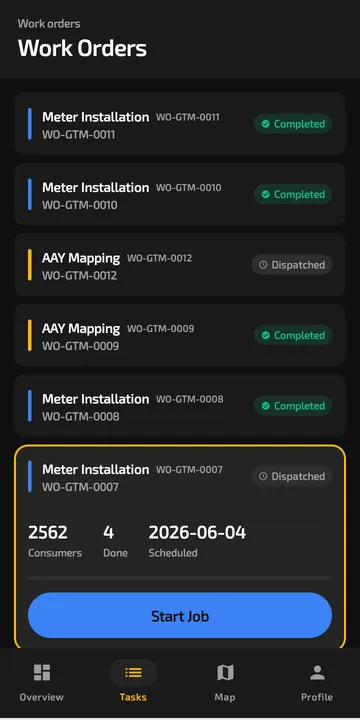 Each work order shows how many consumers are in scope, how many are done and when it is due.
What you see every morning
Installs per agency and crew. Not what an agency says it did, but what was submitted and approved in the system. Save the views you check daily (installs by agency, rejections by crew, jobs waiting for approval) as Smart Views.
Rejections and why. Each rejection carries a note. If one agency's rejection rate jumps, you can see whether it's blurred seal photos or missing final readings, and fix the training rather than argue about the number.
Who was in the field. Selfie and GPS attendance shows which technicians actually checked in, and stationary-agent detection flags phones that have not moved for a long stretch during working hours.
Crew performance. On the Pro plan, performance tracking and a leaderboard rank crews by points and GPS accuracy, which tends to sort out the steady crews from the ones that need a visit.
Holding agencies to a standard without micromanaging them
The point isn't to watch every technician. It's to make the standard the default. Mandatory photo fields, barcode serial capture and duplicate-serial refusal mean a careless job is hard to submit in the first place. Approval notes mean the feedback reaches the person who made the mistake, not just their agency's manager.
That also changes the conversation about payment. When an agency's count comes from approved jobs in a shared system, there is much less to dispute at month end. Filter approved jobs by contractor and date in Smart Views to get the count for each agency.
Reporting to the DISCOM
DISCOMs want progress against the sanctioned quantity, and they want it to hold up when they check. Because every installation carries photos, GPS, serials and an approval history, the figure you report can be traced back to individual jobs.
Running it under your own brand
Larger AMISPs often want the tools their agencies use to carry their own name. The Enterprise plan includes white-labelling and a dedicated instance, along with custom integrations and guided onboarding for your agencies.
Starting with one agency
You don't need to move every agency at once. Most AMISPs pick one agency and one district, run it on the free trial for a couple of weeks, and compare the rework rate and reporting effort with the rest. Paid plans start at ₹4,999/month, and the Pro plan covers 50 users across 3 projects. See pricing.
Built to integrate with your systems
HES, MDM, SAP IS-U, Oracle CC&B and billing systems, over REST, OAuth or a direct SQL connection. How integrations work
Questions buyers ask
What is the best software for an AMISP to manage installation agencies?
Look for one system that every agency works in, rather than a reporting template each agency fills in. It should support offline capture, photo and GPS evidence, barcode serials, approvals with notes, and per-agency progress. PIEBENCH does this by registering each agency as a contractor, with its teams and crews underneath.
Can each installation agency only see its own work?
Access in PIEBENCH is controlled by role, and every job is tied to a team and contractor, so an agency's supervisors see and approve only their own crews' jobs. The AMISP sees across all agencies.
How do I track installer progress daily?
Every submitted and approved job is in the system as soon as the phone syncs, linked to the technician, team and agency. Save the views you check each morning, such as installs by agency or rejections by crew, as Smart Views. There is nothing to merge, so the numbers are current, not a week old.
Can we white-label PIEBENCH for our agencies?
Yes, on the Enterprise plan. It includes white-labelling and a dedicated instance, so agencies and crews see your brand. Enterprise also adds custom integrations, custom feature development, guided onboarding for your agencies and dedicated support. Pricing is on request.
Does the AMISP's HES need to be connected from day one?
No. Crews can start working with service points imported by CSV, and the HES, MDM or billing integration can be added once the process is settled. When you connect it, Connectorly works over REST, OAuth or a direct SQL connection, and setup usually takes about 10 minutes.
Is PIEBENCH suitable for a small installation sub-contractor?
Yes. A sub-contractor working under an AMISP can start on the free trial and move to Starter at ₹4,999/month, which covers 10 users. If the AMISP later brings every agency onto one PIEBENCH setup, the sub-contractor's crews keep using the same app.
Free trial · no card
See it with your own crew
Start a free trial, or ask us for a walkthrough of your rollout.