- Home
- Smart meter field operations
- Smart meter installation
Solution
Smart meter installation app for AMISPs and installation agencies
PIEBENCH is smart meter installation software for teams working under India's RDSS programme. Crews use an offline Android app to record the old meter's final reading, scan the new meter's serial, and capture seal numbers and geotagged photos. AMISPs can add any step, such as a consumer confirmation, without a developer. Supervisors approve each job, and approved data syncs to your HES, MDM or billing system.
Who it's for: AMISPs, installation agencies working under an AMISP, and DISCOM field teams doing meter replacement, NCM visits and new connections. Plans start at $199/month, and the free trial needs no card.
A meter swap, step by step
This is the Meter Installation template as it ships. You can add or remove fields without a developer, but most teams start with it as it is.
- The job arrives. The technician sees the work order on their phone, tied to the service point and its location.
- The old meter. They photograph it, record its serial and the final reading. That final reading is what the billing team will ask about first if a consumer disputes their next bill.
- The new meter. The serial is scanned from the barcode, with a typed fallback for a damaged label. Seal numbers go into their own fields. Before-and-after photos are taken, and the app records a GPS fix with its accuracy.
- Anything else you need. The default flow stops at the meter. If your DISCOM wants a consumer confirmation, a meter box photo or a DT code on every job, add it as a step and make it required. The AMISP changes the flow; there's no developer and no app release involved.
- Save, offline if need be. The job is stored on the phone. If there's no signal, it waits and syncs when the phone reconnects.
- Review. A supervisor approves the job or rejects it with a note saying what to fix.
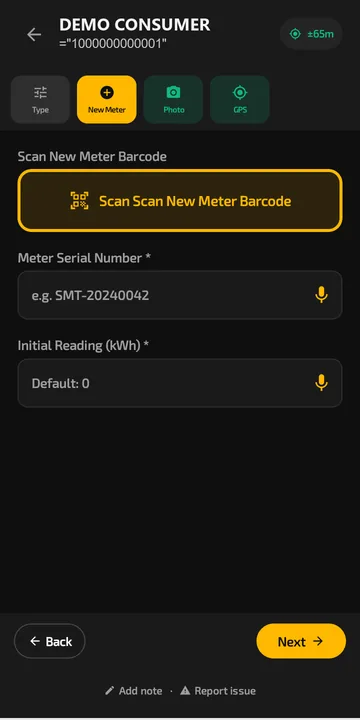 The installation form in Scout. The crew scans the new meter barcode or says the serial number out loud.
What each workflow captures
| Workflow | What the crew captures in Scout (offline) | What the office gets |
|---|---|---|
| Consumer indexing | Consumer ID, account number, DT and feeder, GPS, premises photo | Indexed service points on a map |
| Meter installation or replacement | Old meter serial and final reading, new meter serial by barcode, seal numbers, before and after photos, plus any step you add | Approval queue, rejection notes, installs per crew per day |
| NCM resolution | Fault found, action taken, evidence photos | Result sent to the HES; can close automatically when the HES confirms the meter is reading |
| New connections | Applicant details, site photos, documents | Work order status for the billing system |
| Attendance | Selfie and GPS check-in, stationary-agent alert | Who was out, where, and for how long |
Why installations come back for rework
Ask any installation supervisor what sends a crew back to a premises and you will hear the same short list. A serial with two digits swapped. A seal photo too blurred to read. The old meter's final reading missing because the technician was in a hurry. A job marked done with no photo at all.
The form is where you stop these, not the review. In PIEBENCH, serials come from the barcode scanner, so transposed digits mostly disappear. Photo fields can be made mandatory, so a job can't be saved without them. A meter serial that already exists in the project is refused, which catches the copy-paste mistakes that otherwise only surface during commissioning. GPS accuracy is recorded with each fix, so a supervisor can tell a precise location from a rough guess.
Daily progress per installer, team and agency
The question an AMISP gets every morning is "how many yesterday?" The honest answer usually takes a day to assemble.
In PIEBENCH the count is live. Each approved job is tied to the technician, their team and, if you use contractors, the installation agency the team belongs to. Smart Views let you save the cuts you look at every day: installs by team, rejections by crew, jobs still waiting for approval. On the Pro plan, performance tracking and a leaderboard show which crews are steady and which need a visit. Attendance sits alongside, with selfie and GPS check-in and an alert when a technician has been stationary for too long.
Built for the phone your technicians already carry
Scout runs on Android 7.0 and later, so it works on the low-end phones most field crews carry. The screens are designed for gloved hands and bright sun, with barcode and voice input where typing would be slow. Photos are compressed on the phone before upload, which matters on a 2G connection at the end of a rural feeder.
Offline is the default, not a mode you switch on. Every installation, reading and photo is saved locally first. There's no fixed limit on how many jobs or photos can wait to sync, beyond the phone's free storage.
Changing the form mid-rollout
Rollouts change. Halfway through, the DISCOM asks for the DT code on every job, or a second seal photo, or the old meter's make. In PIEBENCH, an admin adds the field in the form builder the same day. There's no ticket to a vendor and no app release to wait for.
Connecting to your HES, MDM and billing
Installation data is only half done until the HES knows about the new meter. Connectorly, PIEBENCH's integration module, connects to REST APIs, OAuth-protected services or a SQL database, and suggests field mappings with AI so you are not matching column names by hand. It is built to integrate with SAP IS-U and Oracle CC&B-style billing systems, and setup typically takes about 10 minutes. Integrations are included in the Pro and Enterprise plans.
Built by someone who has done the work
PIEBENCH is built on 20 years of power distribution experience. The forms, the checks and the vocabulary come from that work, not from a generic field service template.
Built to integrate with your systems
HES, MDM, SAP IS-U, Oracle CC&B and billing systems, over REST, OAuth or a direct SQL connection. How integrations work
Questions buyers ask
Can an installation agency use PIEBENCH without the AMISP's IT team?
Yes. An agency can start on the free trial on its own, import consumers by CSV and send crews out the same day. The HES or billing integration can be added later, once the AMISP is ready to receive the data. Nothing in the setup needs the AMISP's IT team to be involved at the start.
Does the app work in areas with no mobile network?
Yes. Every job can be completed offline. Readings, serials and photos are saved on the phone and sync automatically when the signal comes back. Crews can work a full day in basement meter rooms or rural areas and upload in the evening, without losing work or re-entering anything.
Can it prove a meter was actually installed?
Each job stores timestamped photos, a GPS fix with its accuracy, the meter serial scanned from the barcode, and seal numbers. Together they show that a technician was at the premises with that meter on that day. With an HES integration, the HES's reply can also flag the installation as communicating, which confirms the meter is live.
How much does smart meter installation software cost?
PIEBENCH has a free trial, then a flat monthly price per plan starting at $199/month. Plans include a set number of users, so you don't pay per technician. Integrations and the workflow builder come with Pro, and Enterprise is priced on request. See the pricing page for the full breakdown.
Which phones does the installation app run on?
Scout runs on Android 7.0 and later. It is designed for the low-end Android phones most installation crews already carry, and for use with gloves and in bright sunlight. Barcode scanning uses the phone camera, so no separate scanner is needed.
Can supervisors approve or reject installations?
Yes. Every submitted job lands in an approval queue. A supervisor can approve it, or reject it with a note explaining what is wrong, and the crew sees that note on their phone. On the Pro plan, rules can approve routine jobs automatically so supervisors spend their time on the exceptions.
Free trial · no card
See it with your own crew
Start a free trial, or ask us for a walkthrough of your rollout.