- Home
- Smart meter field operations
- Integrations
Solution
Smart meter field app integration without middleware
PIEBENCH integrates with HES, MDM and billing systems through Connectorly, its no-code integration module. It pulls consumers, meters and work orders in from REST APIs or SQL databases, and sends approved field jobs back out as events. Setup usually takes about 10 minutes, with AI-suggested field mapping, scheduled runs, automatic retries and a log of every run.
Why integration decides whether a rollout works
A field app that doesn't talk to anything becomes another place to copy data from. The installation is done, the photos are perfect, and then someone in the office types the new meter serial into the head-end system by hand. That is where most commissioning failures start: one transposed digit between the field record and the system of record.
So the question to ask any field platform is not "do you have an API?" but "who builds the connection, how long does it take, and what happens when it fails at 2 a.m.?"
What Connectorly connects to
REST APIs. Any system that exposes data over HTTP, with Basic authentication, a Bearer token or OAuth 2.0. Most modern HES, MDM and billing platforms offer this, and SAP systems usually expose their data as OData services over HTTP, which Connectorly calls like any other API.
SQL databases. PostgreSQL, MySQL, Microsoft SQL Server and SQLite. If your billing team can give you a read-only view or a staging table, Connectorly can read it directly, with no API project needed.
Webhooks. Systems that push data can send it to a Connectorly endpoint as it happens, instead of waiting for a scheduled pull.
Connectorly is built to integrate with SAP IS-U and Oracle CC&B-style billing systems, and with the HES and MDM platforms used in smart metering. See the pages on HES and MDM, SAP IS-U and Oracle CC&B.
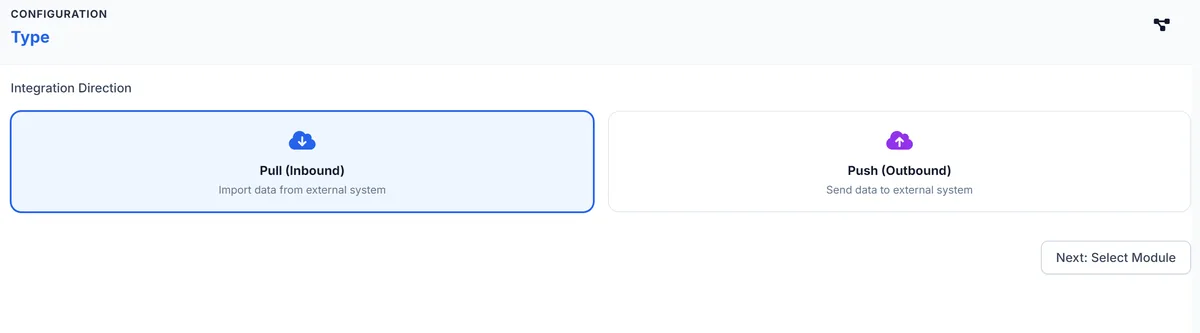 Setting up a Connectorly integration starts with one choice: pull data in, or push it out.
Data in, data out
In. Connectorly can bring records into five places in PIEBENCH: service points, meters, work orders, installations and completed field jobs. A typical setup pulls consumers from billing as service points, the meter stock from the AMISP's inventory, and a list of jobs (for example, non-communicating meters from the HES) as work orders. Filters let you take only the records you want, such as one division or one status.
Out. When a field job is approved, PIEBENCH fires an event for it, for example every approved meter installation. Connectorly sends that record to the system you choose, and tracks whether each delivery succeeded.
How a connection is set up
- Choose the source. Pick REST, SQL or webhook, then enter the address and credentials.
- Test the connection. Connectorly checks that it can reach the system and read a sample before you go further.
- Map the fields. Connectorly reads the structure of the sample and suggests which incoming field matches which PIEBENCH field. You confirm or change each match, and add transformations where formats differ.
- Set a filter and a schedule. Decide which records to take and how often to run: on a schedule, on demand, or as webhooks arrive.
- Watch the runs. Every run is logged with the number of records processed and failed, and you can open any run to see what happened.
For most standard sources this takes about 10 minutes. No middleware layer, no consultant, no code.
When something fails
Integrations fail. Passwords expire, servers restart, a field changes type. Connectorly treats this as normal. Sync jobs retry automatically, up to five attempts with increasing gaps between them, so a short outage on the other side fixes itself. Scheduled runs that are skipped or fail are logged with a reason. And because every run is recorded, the question "did yesterday's installs reach the HES?" has a precise answer.
Who builds it
Usually the same project admin who set up the forms. Connectorly is designed for people who know their data, not people who write code. If your IT team prefers to own the connection, the same screens show them exactly what is being sent and received.
Connectorly is included in the Pro and Enterprise plans. Pro starts at $499 a month; see pricing. Enterprise adds custom integrations built with you.
Questions buyers ask
Can a field app integrate with HES without middleware?
Yes, if the field app can call the HES directly. Connectorly connects to REST APIs (Basic, Bearer or OAuth 2.0), SQL databases and webhooks, maps the fields with AI suggestions, and sends approved installations straight to the HES. There is no separate middleware layer to buy or maintain.
Is there an API for meter installation data?
PIEBENCH pushes approved installation records out as events to the system you choose, and Connectorly can also read from your systems on a schedule. Full API access to PIEBENCH itself is part of the Enterprise plan.
What does no-code integration actually mean here?
You set up a connection through screens, not code: choose REST, SQL or webhook, enter the credentials, test it, accept or change the suggested field mappings, set a filter and a schedule. The person who manages the project data can do it, typically in about 10 minutes for a standard source.
Which databases can Connectorly read from?
PostgreSQL, MySQL, Microsoft SQL Server and SQLite. For other systems, the usual route is their REST API, or a staging table in one of these databases that the source system writes to.
What happens if the other system is down?
Sync jobs retry automatically, up to five times with increasing gaps between attempts. Every run is logged with the records processed and failed, and skipped or failed scheduled runs are recorded with a reason, so you can see exactly what reached the other system.
Which plan includes integrations?
Connectorly is included in Pro (from $499 a month) and Enterprise. Enterprise also adds custom integrations built for your systems, and API access.
Free trial · no card
See it with your own crew
Start a free trial, or ask us for a walkthrough of your rollout.