PIEBENCH covers the whole field operation for smart meter work: work orders and service points in the office, Scout, an offline Android app, in the field, an approval queue with automatic rules, Smart Views, tags and search on every list, attendance, and connectors that sync with your billing system and HES on a schedule. The clips below are recorded in the real console.
PIEBENCH is one system: an office console, an offline app for crews, and an integration layer that keeps both in step with your billing system and head-end. The clips above are recorded in the console against the real backend, using demo data. Here is what each part does.
Work orders
A work order is how work reaches the field. Pick the workflow, the crew and the premises, and the job is on every installer's phone at their next sync.
- Built from your consumer list. Filter service points and select one or hundreds in a single order.
- Assigned to a team or a named contractor, so every installation agency is tracked on its own.
- A clear status at every moment: dispatched, in progress, completed or failed. An order completes itself when every premises is done and nothing is waiting for review.
- Deadlines that enforce themselves. A daily job checks each order's end date. Orders with jobs still in review get a two-day grace period before they close.
- Smart Views in the picker. Apply a saved filter, such as Residential TOU in Dallas, and select every matching premises in one click.
- CSV export for billing sheets and reports.
Service points
Every premises lives as a service point, with its account, address, category, location and a timeline of everything that happened to it.
- Loaded by CSV import or synced from your billing system.
- A lifecycle stage on every premises, from survey through installation.
- A timeline of events: billing syncs, work orders, field visits and lifecycle changes, with who, when and where.
- Claim lock, so two installers never work the same premises at once.
The field app: Scout
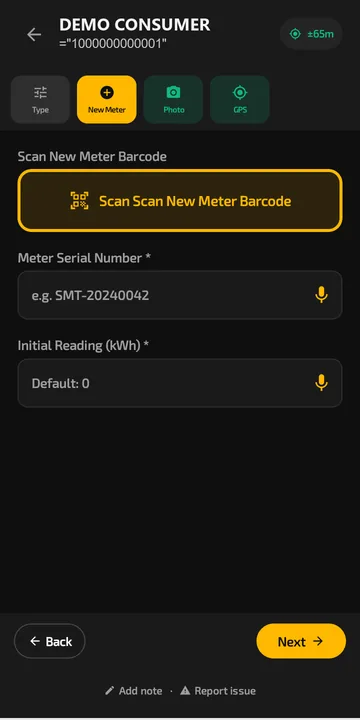
Scout is the Android app crews use. It is offline-first: every job, reading, barcode scan and photo saves on the phone and syncs by itself when signal returns. It runs on Android 7.0 and later, with barcode scanning through the camera, voice input and a layout built for gloved hands. See the offline field app for the detail.
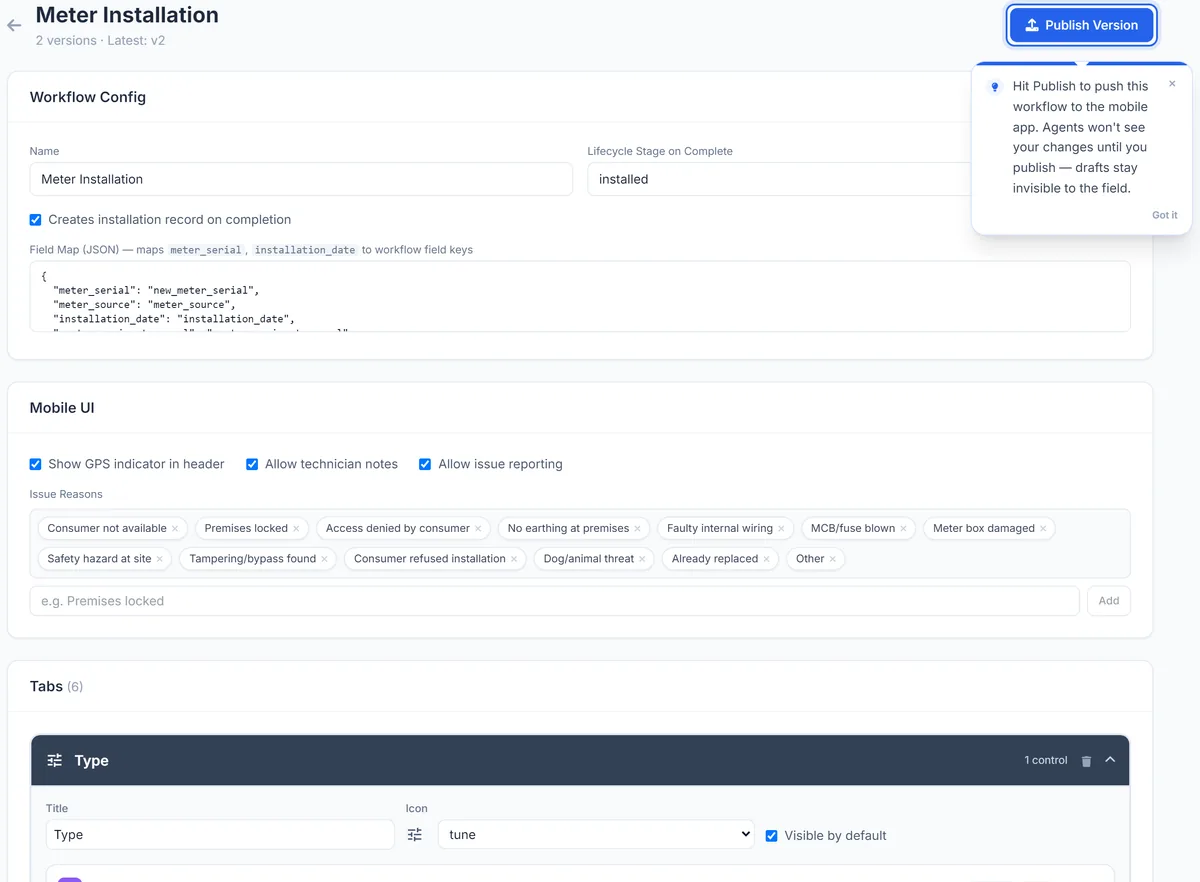
- Ready forms for meter installation and consumer indexing, or your own from the no-code workflow builder on Pro.
- Required photos and GPS with accuracy on every job.
- A meter serial already used in the project is refused.
- On-duty mode: crews pick up and create work orders on site.
Meter installations and inventory
When a job is submitted, the installation record arrives with the new serial, the old meter's final read, photos and GPS, and the meter moves from stock to installed at that premises.
- New serials checked against your meter inventory.
- Billing and HES sync status on every record, with a retry when a delivery fails.
Approvals
Submitted jobs go to an approval queue. A supervisor approves them or sends them back with a note the installer sees on the phone. See installation verification.
On Pro, automatic approval rules pass clean jobs and leave supervisors only the exceptions: photo present, serial not empty, GPS recorded, GPS within a set distance of the premises or of earlier visits, and meter taken from inventory.
Search, filters, Smart Views and tags
The same tools work on every list, from work orders to meters to installations.
- Search and filters run on the server, so large lists stay fast.
- Smart Views save any filter so supervisors open the cut they check every morning in one click (from Starter).
- Tags go on jobs, meters and service points, in bulk. Connectors can also tag records automatically after each sync.
Integrations: Connectorly
Connectorly connects PIEBENCH to your billing system, MDM or HES over REST, OAuth or a direct SQL connection, from the console, with no middleware. Available on Pro.
- Inbound: pull consumers and meters on a schedule (hourly, daily or weekly) or on demand. Failed runs retry automatically, and every run is logged.
- Outbound: approved jobs are sent to your systems as they happen, with delivery tracked per record.
- Webhooks: other systems can push data in.
- Field mapping in the console, with a match key so re-syncs update records instead of duplicating them.
Want to test an integration before your project has a test system? Use the free utility API sandbox. The clip above syncs from it. See integrations for HES, MDM, SAP IS-U and Oracle CC&B.
Attendance and live tracking
From Starter: on-duty check-in with a selfie and GPS, alerts for agents who stay in one place too long, duty hours, and live locations while crews are on duty. See the field attendance app.
Performance
On Pro, points, levels and a leaderboard rank installers and teams, recalculated every day from completed and approved work.
Claude and ChatGPT
Connect PIEBENCH to Claude or ChatGPT and ask about crews, work orders and approvals in plain English, with the permissions you choose. See Claude & ChatGPT.
Security and access
Each workspace is isolated. Access is set by role, from field agent to admin, and checked on every action, with an audit trail of executions, approvals and syncs.
Which plan has what
| Plan | What it adds |
|---|---|
| Free trial | The core workflow: work orders, Scout, approvals |
| Starter | Attendance, CSV import, Smart Views, on-duty live tracking |
| Pro | Connectorly integrations, automatic approval rules, the workflow builder, performance and leaderboard |
| Enterprise | API access, plus a dedicated setup |
Paid plans start at $199/month. See pricing, or read how it all fits together in smart meter field operations.
Built to integrate with your systems
HES, MDM, SAP IS-U, Oracle CC&B and billing systems, over REST, OAuth or a direct SQL connection. How integrations work
Questions buyers ask
What does PIEBENCH do?
It runs field operations for smart meter work: work orders and service points in the office, an offline Android app for crews, an approval queue, and integrations with billing systems and head-end systems. It is used for meter installation, consumer indexing, NCM visits and other field jobs.
Does PIEBENCH work offline?
Yes. Scout, the Android app, saves every job, reading, scan and photo on the phone and syncs automatically when signal returns. It runs on Android 7.0 and later.
Can PIEBENCH sync with our billing system automatically?
Yes, on the Pro plan. Connectorly pulls consumers and meters on a schedule, hourly, daily or weekly, and sends approved jobs back as they happen, with delivery tracked per record. It connects over REST, OAuth or a direct SQL connection.
How do I pick the premises for a work order quickly?
Filter the service point list, or apply a saved Smart View, and select every match in one click. A work order can hold hundreds of premises.
Can approvals be automatic?
Yes, on Pro. Rules such as photo present, GPS recorded, GPS within a set distance of the premises, and meter taken from inventory pass clean jobs automatically, so supervisors only review the exceptions.
Are the clips on this page real?
Yes. They are recorded in the PIEBENCH console running on the real backend, using demo data. The integrations clip is a real HTTP sync from the PIEBENCH utility API sandbox.
Free trial · no card
See it with your own crew
Start a free trial, or ask us for a walkthrough of your rollout.