- Home
- Smart meter field operations
- AMI deployment software
Solution
AMI deployment software for meter installation contractors
PIEBENCH is AMI deployment software for meter installation contractors and the utilities they work for. Crews run meter exchanges in an offline Android app that captures the old meter's final read, the new meter's barcode serial, photos and GPS. Supervisors approve each job, duplicate serials are refused, and installs per crew per day are visible the same day. Plans start at $199/month.
Who it's for: contractors running AMI deployments and meter replacement projects for US utilities, municipal utilities and co-ops managing their own meter exchange program, and the project managers who answer for the numbers. The free trial needs no credit card.
What an AMI deployment actually has to track
An AMI deployment is a volume business. The utility hands over an account file, the contract sets a number of meters, and the crews have weeks or months to exchange them. Three things decide whether the project makes money.
Production. How many meters did each crew exchange yesterday, and how many are left? On most projects that answer comes from a spreadsheet someone rebuilds every evening from texts and photos.
Quality. A transposed serial, a missing final read or a blurry photo of the new endpoint means a truck roll back to an address the crew already visited. Rework is where deployment margins go.
Data back to the utility. Every exchange has to reach the utility's CIS, MDM or head-end system with the right old and new serials. If someone re-keys it, errors creep in at exactly the step that decides whether the new meter bills correctly.
How PIEBENCH runs a deployment
- Load the account file. Import the utility's account and premises list by CSV, or pull it from their system. Each address becomes a service point on the map, and every job, photo and read is tied to it.
- Set up the exchange form. Start from the Meter Installation template. On the Pro plan, change it or build your own in the no-code form builder, with barcode, photo, GPS, number, dropdown, checklist and counter fields. Your admin makes the change, not a developer.
- Assign the work. Work orders go to crews, and crews can sit under a named subcontractor, so you can track each sub's production separately.
- Exchange meters, offline. Technicians complete each job in Scout, the Android app. Everything is saved on the phone first and syncs when there is signal.
- QC every job. Supervisors approve each exchange or reject it with a note the crew sees on their phone. On the Pro plan, rules can approve routine jobs automatically.
- Send it on. Approved exchanges go to the utility's systems through Connectorly, PIEBENCH's integration module.
What the crew captures on every exchange
| Step | Captured in Scout (works offline) | Why it matters |
|---|---|---|
| Old meter | Photo, serial, final read | The final read is the first thing billing asks about in a dispute |
| New meter | Serial by barcode scan, typed fallback for damaged labels | One wrong digit and the meter never bills correctly |
| Seals and evidence | Seal numbers, before and after photos, required photo fields | A job can't be saved without the proof you made mandatory |
| Location | GPS fix with its accuracy | Shows the crew was at the address, and how precise the fix was |
| Your extras | Any field you add in the form builder (Pro), such as meter size or a site condition | Utilities change requirements mid-project |
A meter serial that already exists in the project is refused at the form, which catches copy-paste mistakes before they reach the utility.
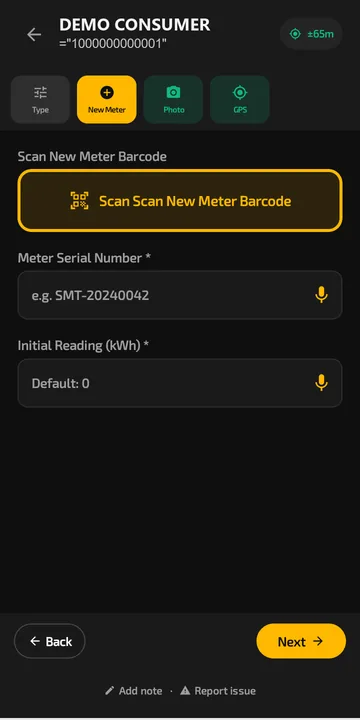 The exchange form in Scout. The crew scans the new meter barcode or says the serial out loud.
Daily production by crew and subcontractor
Each approved job is tied to the technician, their crew and, if you use subs, the subcontractor the crew belongs to. Smart Views save the cuts you check every morning: installs per crew, rejections per crew, jobs waiting for QC. On the Pro plan, performance tracking and a leaderboard show which crews are steady and which need a ride-along. Field attendance sits alongside, with selfie and GPS check-in and an alert when a technician has been stationary too long.
Getting exchange data to the utility
Connectorly connects to REST APIs, OAuth-protected services and SQL databases, and suggests field mappings with AI so nobody matches column names by hand. It is built to integrate with SAP IS-U and Oracle CC&B-style systems, and a connection typically takes about 10 minutes to set up. Integrations are included in the Pro and Enterprise plans. If the utility only takes a file, work orders export to CSV. See integrations for how a connection is built.
Pricing without per-install fees
PIEBENCH charges a flat monthly price per plan. Each plan includes set limits on users, service points and work orders. There are no setup fees and no charge per completed install, so a bigger project moves you up a plan rather than adding a fee to every meter. Plans start at $199/month, and the free trial needs no card. See pricing for what each plan includes.
Check the fit before you choose
PIEBENCH was built for large smart meter rollouts in India, then opened to contractors elsewhere. Be clear about what that means for a US project:
- Scout is Android-only. It runs on Android 7.0 and later. Office staff use the web console in any browser. If your crews carry iPhones, this matters.
- The templates come from electric metering. For water or gas exchanges, you set the fields yourself in the form builder on the Pro plan.
- Test offline before you sign anything. Put a phone in airplane mode, complete three exchanges with photos and serials, restart it, then reconnect and see what reaches the office. Do that with every vendor on your shortlist.
For the crew's side of the job, see the meter exchange app. For head-to-head comparisons, see PIEBENCH vs MeterWorx and PIEBENCH vs Fieldman.
Built to integrate with your systems
HES, MDM, SAP IS-U, Oracle CC&B and billing systems, over REST, OAuth or a direct SQL connection. How integrations work
Questions buyers ask
What software do AMI deployment contractors use?
Most use either a metering-specific deployment platform or a general field service tool configured for meter exchanges, often with spreadsheets alongside. Look for offline capture, barcode serials, photo and GPS proof, QC approvals, daily production by crew, and a clean way to send exchange data back to the utility. PIEBENCH covers these with published prices.
How do I track daily meter installs by crew?
Tie every job to a technician and crew, and count approved jobs rather than submitted ones. In PIEBENCH, Smart Views save views like installs per crew per day, rejections per crew and jobs waiting for QC, and they update as jobs are approved. Subcontractor crews can be tracked separately.
Does AMI deployment software work without cell coverage?
It should, because basements, rural routes and meter banks often have no signal. Scout, PIEBENCH's Android app, saves every job, read and photo on the phone and syncs automatically when the signal returns. There is no fixed limit on queued jobs beyond the phone's free storage.
How much does AMI deployment software cost?
Pricing models vary: some vendors charge setup fees, a platform fee per job site and a rate per completed install, while others quote per project. PIEBENCH has a free trial, then a flat monthly price per plan from $199/month, with set limits on users and work orders, no setup fees and no per-install charge.
Is PIEBENCH field service management software for US meter contractors?
It is field service management built for one kind of work: smart meter deployment and meter replacement. US contractors get work management, crew management, offline capture, QC approvals and daily production by crew in one system, without configuring a general field service suite for meter exchanges. Teams outside the United States use it too.
Can PIEBENCH send meter exchange data to our CIS or MDM?
Yes, through Connectorly, which connects to REST APIs, OAuth-protected services and SQL databases with AI-suggested field mapping. It is built to integrate with SAP IS-U and Oracle CC&B-style systems. Integrations come with the Pro and Enterprise plans. Work orders can also be exported to CSV if the utility only accepts a file.
Does PIEBENCH have an iPhone app?
No. Scout, the field app, runs on Android 7.0 and later. Supervisors, project managers and office staff use the web console from any browser. If your crews only carry iPhones, PIEBENCH is not the right fit today.
Free trial · no card
See it with your own crew
Start a free trial, or ask us for a walkthrough of your rollout.