- Home
- Smart meter field operations
- Meter exchange app
Solution
A meter exchange app for utility changeout crews
Scout, PIEBENCH's Android app, is a meter exchange app for utility changeout crews. Each job records the old meter's serial and final read, scans the new meter's barcode, and captures seal numbers, photos and a GPS fix, all offline. Duplicate serials are refused at the form, and a supervisor approves the job or sends it back with a note the technician sees on the phone.
Who it's for: meter technicians and crew leads doing utility meter changeouts in the US and elsewhere, and the field supervisors who check their work. A meter exchange goes by many names, including changeout, meter replacement and meter swap; the job is the same. Scout comes with every PIEBENCH plan, including the free trial.
What goes wrong on a changeout
Ask a crew lead why a technician had to go back to an address and you will hear the same list:
- The new meter's serial was typed with two digits swapped.
- The old meter's final read was skipped because the job was running late.
- The photo of the new meter was too blurry to read the serial.
- The job was marked complete with no photo at all.
- The app lost the job because the meter was in a basement with no signal.
Every one of those is a second truck roll, at the contractor's cost. The fix is to stop them in the form, before the technician drives away, not in QC a week later.
A meter exchange in Scout, step by step
- Open the job. The work order is already on the phone, synced at the yard, with the address and service point details.
- Record the old meter. Photo, serial and final read. The form won't save without the fields you made required.
- Install the new meter. Scan its barcode with the phone camera, or say the serial out loud if your hands are full. A damaged label can be typed in.
- Seal and photograph. Seal numbers go in their own fields, then before and after photos.
- Save, signal or not. Scout saves the job on the phone with a GPS fix and its accuracy. If there's no signal, the job waits and syncs on its own later.
- Fix rejections fast. If QC rejects the job, the note says what is wrong, such as "seal photo unreadable", and the technician sees it on the phone.
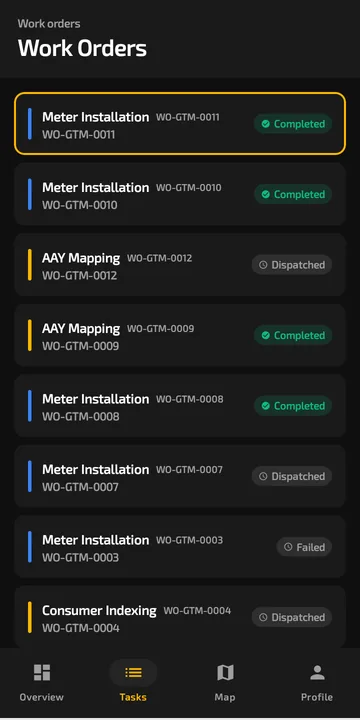 The day's work orders stay on the phone, with their status, signal or no signal.
Built for the truck, not the office
Offline-first. Scout stores jobs in a database on the phone. Opening, filling in and saving a job all happen locally, so there's no offline mode to remember to switch on. Photos are compressed before upload, and a full day of exchanges can sync over a weak connection at the end of the shift. There is no fixed limit on how many jobs can wait, beyond the phone's free storage. More on how that works on the offline field app page.
Barcode and voice input. Serials come from the camera barcode scanner, so transposed digits mostly disappear. There is no separate scanner to buy or lose.
Gloves and sun. Screens are designed for gloved hands and bright sunlight.
Cheap phones are fine. Scout runs on Android 7.0 and later, so most low-cost Android phones work.
Duplicate serials are refused. If a serial already exists in the project, the form says so. That catches the copy-paste mistake before it reaches the utility's billing system.
What the supervisor sees
Every submitted exchange lands in an approval queue with its photos, serials, final read and GPS fix. The supervisor approves it or rejects it with a note. On the Pro plan, rules can approve routine jobs automatically, for example when every required photo is present and the GPS fix matches the service point. That leaves the supervisor looking at the exceptions. See installation verification for how the checks work.
The office sees approved exchanges per technician and crew the same day, and attendance alongside, with selfie and GPS check-in.
Change the form mid-project
Utilities change requirements. Halfway through, they want the meter size on every job, or a photo of the meter base. On the Pro plan, an admin adds the field in the no-code workflow builder, and phones pick it up on their next sync. No vendor ticket, no app store release.
Try it on one crew
Start the free trial, add a few addresses, pick the Meter Installation template and add two technicians. Do real exchanges in airplane mode and check what reaches the office. CSV import of your full address list comes with paid plans, which start at $199/month with users included, so you are not paying per technician. For the contractor's view of a full deployment, see AMI deployment software.
Built to integrate with your systems
HES, MDM, SAP IS-U, Oracle CC&B and billing systems, over REST, OAuth or a direct SQL connection. How integrations work
Questions buyers ask
What is the best app for meter changeout crews?
One that works fully offline, scans serials by barcode, makes photos and final reads mandatory, refuses duplicate serials, and lets a supervisor send a job back with a note. Scout, PIEBENCH's Android app, does all of this. Test any app by doing three exchanges in airplane mode on a cheap phone before you pick it.
How do I record each meter exchange as proof?
Attach evidence to every job: the old meter's serial and final read, the new meter's serial scanned from its barcode, seal numbers, before and after photos, and a GPS fix with its accuracy. In Scout these are captured on the phone, offline if needed, and stored with the job for QC and disputes.
Can technicians do meter exchanges with no cell signal?
Yes. Scout keeps the day's work orders on the phone and saves every job locally. When signal returns, completed jobs sync automatically. A phone restart or dead battery doesn't lose saved work, because jobs are stored in a database on the device rather than in memory.
Does the meter exchange app work on iPhone?
No. Scout runs on Android 7.0 and later only. Supervisors and office staff use the PIEBENCH web console from any browser, including on an iPhone or iPad.
Can it catch a wrong meter serial?
It catches the most common mistakes. Serials are scanned from the barcode instead of typed, and a serial that already exists in the project is refused. Supervisors also see the photo of the new meter next to the scanned serial, so a mismatch is easy to spot in QC.
Can we use it for water and gas meter exchanges?
Yes. The workflow is the same: old meter, new meter, photos, location, QC. The built-in template comes from electric smart metering, so for water or gas you set the fields you need, such as meter size or register read, in the no-code form builder on the Pro plan.
Free trial · no card
See it with your own crew
Start a free trial, or ask us for a walkthrough of your rollout.