- Home
- Smart meter field operations
- Meter installation tracking app
Solution
Meter installation tracking app for contractors and field teams
PIEBENCH is a meter installation tracking app for contractors whose teams install meters every day. Installers record each job in an offline Android app, and the office sees the daily installed count, installer-wise and team-wise progress, and jobs that are pending or rejected, as they happen. Every installation carries photos, GPS and a scanned meter serial. Plans start at $199/month.
Who it's for: meter installation contractors, installation agencies working under an AMISP, and DISCOM teams who need to know how many meters their people installed today, and which ones still need work.
The question every contractor gets at 9 am
"How many yesterday?" The AMISP asks it, the DISCOM asks it, and the honest answer usually takes half a day. Installers send photos on WhatsApp. A supervisor copies serials into Excel at night. Someone merges five sheets in the morning and still can't say which jobs were rejected, or why.
The count also hides the real questions. Which installer did 40 and which did 4? Which jobs are done but waiting for approval? Which were sent back because the seal photo was unreadable? A tracking app should answer all of them without anyone typing a spreadsheet.
What you see every day
| View | What it shows | Why it matters |
|---|---|---|
| Daily installed count | Approved installations today, yesterday and this week | The number the AMISP and DISCOM ask for |
| Installer-wise progress | Jobs completed per technician per day | Spot the slow and the struggling early |
| Team and agency progress | The same, grouped by team or contractor | Compare crews and sub-agencies fairly |
| Pending jobs | Submitted, waiting for supervisor approval | Clear the queue before it piles up |
| Rejected jobs | Sent back with the supervisor's note | Rework, before it turns into a second visit |
| Attendance | Who checked in, where, and for how long | Presence and output side by side |
These are saved as Smart Views, so each supervisor opens the cut they check every morning. On the Pro plan, performance tracking and a leaderboard rank installers and teams over time.
How tracking works
- Load the work. Import consumers or premises by CSV, or pull them from billing. Each becomes a service point on the map.
- Assign it. Work orders go to teams, and teams can sit under a named contractor, so every installation agency is tracked on its own.
- Install and record, offline. Installers complete each job in Scout, the Android app: old meter serial and final reading, new meter serial by barcode, seal numbers, photos and GPS. No signal needed.
- Review. A supervisor approves each job, or rejects it with a note the installer sees on the phone.
- Count what passed. The daily count includes approved jobs, so you report installations that will stand up, not just submissions.
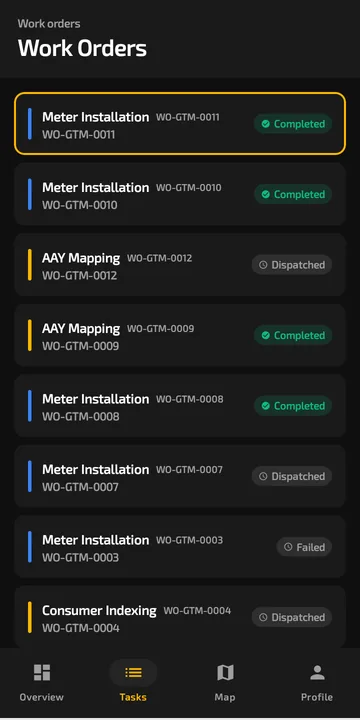 Each installer's jobs and their status, on the phone and in the office.
Proof attached to every count
A number on a dashboard is only as good as the evidence behind it. Each installation in PIEBENCH carries timestamped photos, a GPS fix with its accuracy, the meter serial scanned from the barcode and the seal numbers. A meter serial that already exists in the project is refused, so the same meter cannot be counted twice. See installation verification for how supervisors check it.
Built for installers on the move
Scout works fully offline, on Android 7.0 and later, so low-cost phones are fine. Jobs and photos are saved on the phone and sync when signal returns, with photos compressed for 2G and 3G. More on that on the offline field app page. Installers check in for duty with a selfie and GPS, and supervisors can see on-duty staff live. See field attendance.
Paying installers for verified work
Many contractors pay installers or sub-agencies per meter. Because every job carries an approval status, you can count approved installations per installer or agency for the period in Smart Views, and pay for work that passed review. Work orders export to CSV for your billing sheet.
From Excel to a tracking app
You don't have to switch everything at once. Start with one team: import their area, use the ready Meter Installation template and run it next to your spreadsheet for a week. Compare the morning count. The guide moving meter rollout tracking from Excel to an app covers the switch step by step, and Excel vs app covers the case for it.
Attendance, CSV import, Smart Views and On-Duty live tracking come from the Starter plan at $199/month. The free trial lets you try the workflow first. See pricing.
For a single installer who just needs to record their own jobs, see the meter installation record app.
Built to integrate with your systems
HES, MDM, SAP IS-U, Oracle CC&B and billing systems, over REST, OAuth or a direct SQL connection. How integrations work
Questions buyers ask
Which app can track meter installations done by my team every day?
A field app built for metering, where each installer records jobs on their phone and the office sees counts per installer and team as jobs are approved. PIEBENCH does this with an offline Android app, Smart Views for daily progress, and approvals with rejection notes. Plans start at $199/month, after a free trial.
How do I see installer-wise progress?
Every job in PIEBENCH is tied to the installer who did it, their team and their contractor. A Smart View grouped by installer shows jobs completed per person per day, and the same view by team or agency shows group progress. On the Pro plan, a leaderboard ranks installers over time.
Can I see pending and rejected installations?
Yes. Submitted jobs wait in an approval queue until a supervisor approves or rejects them. Rejected jobs carry the supervisor's note and go back to the installer's phone. Smart Views can list pending and rejected jobs by team, so nothing sits unnoticed.
Does the tracking app work without network?
Yes. Installers complete and save jobs offline in Scout, including photos and barcode scans. Jobs sync automatically when the phone has signal, so the office count updates as each phone reconnects. There is no fixed limit on queued jobs beyond the phone's free storage.
Can I track sub-contractors separately?
Yes. Teams can sit under a named contractor, so installations by each sub-agency are counted separately. Agency supervisors see and approve only their own crews, while you see everyone.
How much does a meter installation tracking app cost?
PIEBENCH has a free trial, then a flat monthly price per plan from $199/month, with users included, so you are not paying per installer. Attendance and Smart Views start on Starter. Approval rules, the workflow builder and integrations come with Pro.
Free trial · no card
See it with your own crew
Start a free trial, or ask us for a walkthrough of your rollout.