- Home
- Smart meter field operations
- Meter installation record app
Solution
A meter installation record app for installers
If you do meter installation work, Scout, PIEBENCH's Android app, records each installation as one job: the consumer number, the old meter's serial and final reading, the new meter's serial by barcode, seal numbers, photos and GPS. It works offline, refuses a serial you have already used, and keeps every record ready for your supervisor, contractor or DISCOM.
Who it's for: meter installers and technicians who want a proper record of every job, and the contractors they work for.
Why a record matters
Every installation can come back to you. The consumer disputes their first smart meter bill and asks for the old reading. The DISCOM finds a meter that isn't communicating and asks which serial went in. Your contractor pays per meter and says your count is short. On WhatsApp and paper, the answer is a long search through photos with no dates. With a record app, it is one job you can open.
What each record holds
| Field | How it's captured | Why it matters |
|---|---|---|
| Consumer number and address | Comes with the job, from the service point | Ties the meter to the right account |
| Old meter serial | Typed or scanned | Proves which meter came off |
| Old meter final reading | Number field, with a photo | The first thing billing asks for in a dispute |
| New meter serial | Barcode scan, voice or typed | One wrong digit and the meter never bills |
| Seal numbers | Their own fields | Shows the meter was sealed |
| Photos | Before and after, required if your contractor sets it | Visual proof of the work |
| GPS | Recorded with its accuracy | Shows you were at the premises |
| Date and time | Automatic | Settles "when" questions |
Recording an installation, step by step
- Open the job. It is on your phone with the consumer's details, synced before you left.
- Old meter. Take a photo, enter or scan the serial and enter the final reading.
- New meter. Scan the barcode with the phone camera. If the label is damaged, type it or say the number out loud.
- Seals and photos. Enter seal numbers and take the after photos.
- Save. The job saves on the phone with GPS and time, even with no signal.
- Sync. When you have network, the record uploads by itself. If your supervisor sends it back, you see their note and fix it.
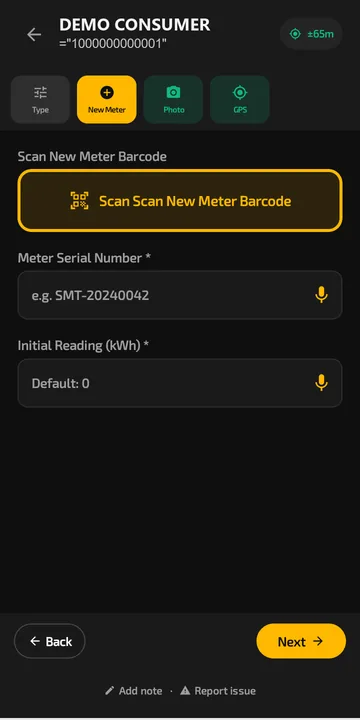 Recording an installation in Scout: scan the new meter barcode or say the serial out loud.
Mistakes the app stops
- Swapped digits. Serials come from the barcode, so typing errors mostly disappear.
- Using a serial twice. A meter serial already used in the project is refused.
- Forgetting a photo. Required photo fields mean the job can't be saved without them.
- Losing work. Jobs are stored in a database on the phone, so a restart or dead battery doesn't lose them.
Works on your phone, with or without signal
Scout runs on Android 7.0 and later, so most low-cost phones work. It is designed for gloves and bright sun. Everything saves offline first, and photos are compressed so they upload over a weak connection. See the offline field app page for how that works.
Do I need my contractor to use it too?
The best setup is when your contractor or AMISP runs PIEBENCH and assigns jobs to you, because then your records go straight into their approval queue and count. A team lead can also start the free trial alone, add a few jobs and try it out. Contractors who want daily counts for a whole team should see the meter installation tracking app.
Why not a general form app?
General form tools such as KoboToolbox, Google AppSheet or Jotform can record photos and fields, and some work offline. What they don't come with is the metering logic: the Meter Installation template, duplicate serial checks within a project, supervisor approval with notes, and counts per installer. You can build parts of that yourself. PIEBENCH has it ready. See PIEBENCH vs KoboToolbox, vs AppSheet and vs Jotform.
Paid plans start at $199/month, with users included, after a free trial. See pricing.
Built to integrate with your systems
HES, MDM, SAP IS-U, Oracle CC&B and billing systems, over REST, OAuth or a direct SQL connection. How integrations work
Questions buyers ask
I do meter installation work. Which app can I use to record each installation?
Use an app built for meter installation, so each job captures the old and new meter serials, the final reading, seal numbers, photos and GPS in one record. Scout, PIEBENCH's Android app, does this offline and refuses a serial you have already used. General form apps can work, but you build the fields and checks yourself.
What should I record for every meter installation?
At least the consumer number, the old meter serial and final reading, the new meter serial, seal numbers, before and after photos, GPS location and the date and time. Those answer almost every billing dispute, commissioning problem and payment question that comes back later.
Can I record installations without internet?
Yes. Scout saves each installation on the phone, including photos and barcode scans, and uploads it automatically when you have signal. Records stay on the phone through restarts until they sync.
Does the app scan the meter barcode?
Yes. Scout uses the phone camera to scan the new meter's barcode, so no separate scanner is needed. If the label is damaged, you can type the serial or say it out loud.
Is there a free meter installation record app?
PIEBENCH has a free trial to try the workflow. Paid plans start at $199/month per month for a team, with users included. Open-source tools like KoboToolbox are free, but you build the installation form and checks yourself.
Can my contractor see my records?
Yes, when your contractor runs PIEBENCH and assigns you jobs. Each record you submit goes to their approval queue with all the evidence, and approved jobs count towards your daily total.
Free trial · no card
See it with your own crew
Start a free trial, or ask us for a walkthrough of your rollout.